
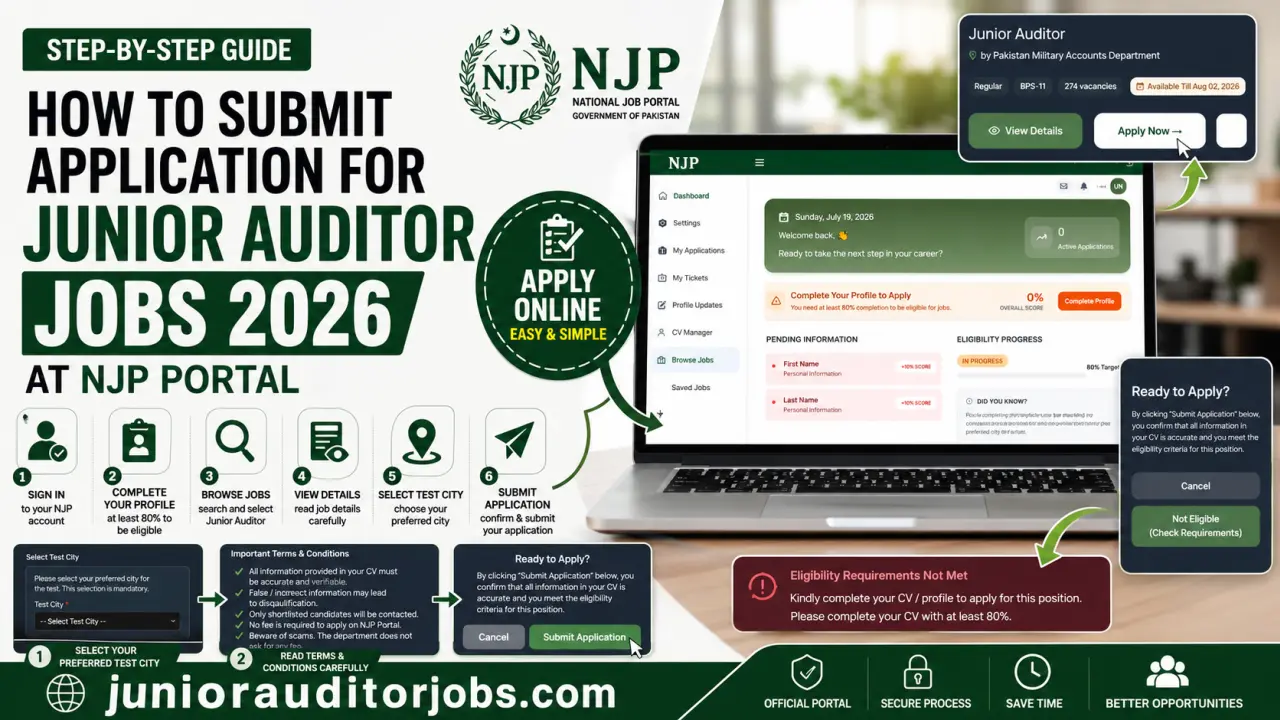
Submitting your application for Junior Auditor Jobs 2026 through the National Job Portal (NJP) is the final step after creating an account and signing in. However, many applicants become confused when they do not see the Apply Now button or receive an eligibility message while trying to submit their application.
The screenshots provided from the NJP Portal show that applicants must first complete their profile before they become eligible to apply for jobs. The portal displays a progress indicator and reminds users to complete their profile information before submitting an application.
This guide explains the complete application submission process in simple English using the NJP Portal screens you provided. Every step discussed below is based only on the official portal interface and the recruitment process shown in the screenshots.
👉 You may like: Cadet College Jhelum Jobs 2026 for Non-Teaching Staff
Sign In to Your NJP Account
The first step is to log in to your National Job Portal account.
Enter your CNIC number, registered email address, and password on the NJP login page. After successful login, you will be taken to your personal dashboard where you can manage your profile, applications, and job searches. If you do not already have an account, you must first complete the NJP registration process before proceeding.
Complete Your Profile Before Applying
One of the most important requirements shown on the NJP dashboard is profile completion.
👉 You may like: ANF Jobs 2026 Online Apply for Stenotypist, UDC, LDC & More
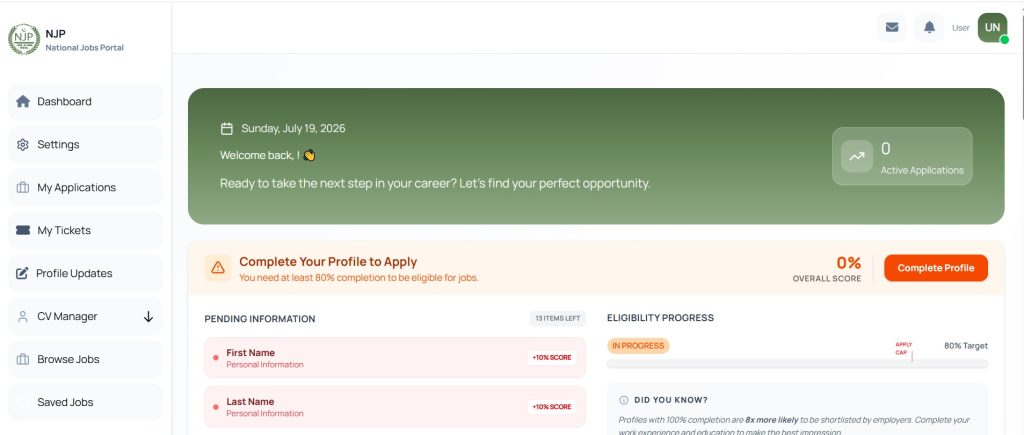
After logging in, the dashboard displays a message asking users to Complete Your Profile to Apply. According to the portal, applicants need to complete at least 80% of their profile to become eligible for jobs.
The dashboard also shows an eligibility progress bar and a list of pending information. In the screenshots provided, personal information such as the applicant’s first name and last name appears under pending items until completed.
👉 You may like: Cadet College Jhelum Faculty Jobs 2026 for Male Teachers
Candidates should carefully complete every required section before attempting to submit any job application.
Update Your CV Manager Information
The NJP dashboard includes a CV Manager section where applicants can manage their profile information.
Before applying, make sure your CV contains complete and accurate details. The application page shown in the screenshots also displays an eligibility message reminding applicants to complete their CV before they can proceed.
The official portal uses this information to determine whether your profile is complete enough to apply for available vacancies.
Browse Available Jobs
Once your profile is completed, open the Browse Jobs section from the left-side menu.
This page displays available government vacancies published through the National Job Portal.
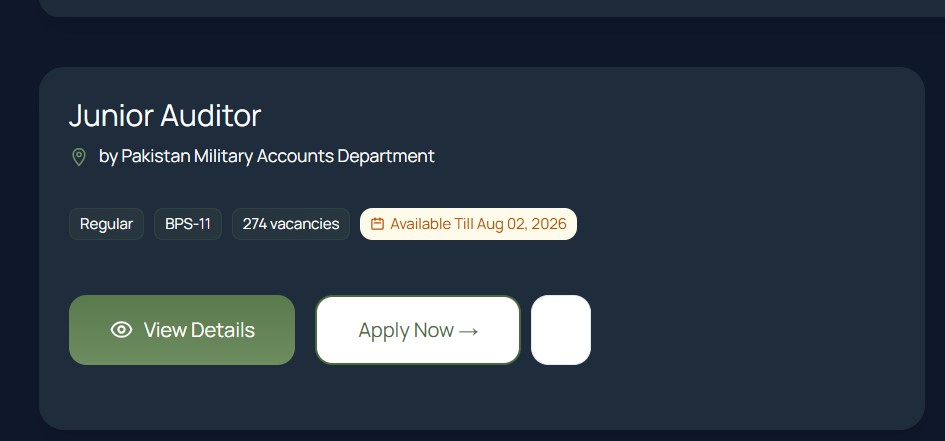
Search for Junior Auditor and locate the vacancy announced by the Pakistan Military Accounts Department.
The job card displayed on the portal shows useful information such as:
- Job title
- Organization
- BPS-11
- Total vacancies
- Application availability
After locating the vacancy, click View Details to read the complete job information.
Read the Job Details Carefully
Before submitting your application, carefully review the complete job advertisement.
Reading the details helps you confirm that you meet the required educational qualifications, age limit, typing requirement, and other eligibility conditions mentioned by the recruiting department.
Applicants should never submit an application without first reviewing the official requirements.
Click Apply Now
After reviewing the vacancy details, click the Apply Now button.
The application page opens and displays additional information related to the recruitment process.
If your profile is incomplete, the portal may display an Eligibility Requirements Not Met message. The screenshots clearly show that applicants must complete their CV before becoming eligible to continue.
Select Your Test City
The application page requires applicants to select their preferred Test City.
A drop-down menu is provided for this purpose.
According to the portal, selecting a test city is mandatory before submitting the application.
Candidates should choose their preferred city carefully because the portal indicates that this selection is required for the recruitment process.
Read the Terms and Conditions
Before submitting the application, applicants should carefully read the Important Terms & Conditions displayed on the application page.
The portal reminds candidates that:
- All information provided in the CV must be accurate and verifiable.
- False information may result in disqualification.
- Applicants must meet the eligibility criteria.
- Only shortlisted candidates will be contacted.
- No fee is charged for applying through the government job portal.
- Applicants should beware of scams asking for money.
- Submitting the application means accepting the stated terms and conditions.
Reading these instructions carefully helps applicants understand their responsibilities before final submission.
Submit Your Application
Once your profile is complete, your test city has been selected, and you have reviewed the terms and conditions, you can submit your application.
The final section of the application page asks candidates to confirm that the information entered in their CV is accurate and that they meet the eligibility criteria for the position.
After confirmation, submit your application through the NJP Portal.
The screenshots indicate that the submission option becomes available only after the required conditions have been satisfied.
What Happens After Submission?
After submitting your application, keep checking your NJP dashboard and registered email address.
According to the official recruitment advertisement, only shortlisted candidates will be contacted for the next stage of recruitment. Information regarding the written test will be communicated separately through email.
Applicants should also keep their profile updated in case additional information is required later.
Common Mistakes to Avoid
Many applicants face problems because they try to apply before completing their profile.
Another common mistake is ignoring the eligibility message displayed on the application page. If the portal says that eligibility requirements are not met, applicants should first complete the missing profile information before trying again.
Candidates should also verify that every detail entered in their CV is accurate because the portal clearly states that incorrect information may lead to disqualification.
Finally, applicants should carefully select their preferred test city before submitting the application, as this step is mandatory according to the application page.
Frequently Asked Questions (FAQs)
Do I need to complete my NJP profile before applying?
Yes. The NJP dashboard shown in the screenshots clearly indicates that applicants need to complete at least 80% of their profile before becoming eligible to apply for jobs.
Why does the portal show “Eligibility Requirements Not Met”?
According to the application page shown in the screenshots, this message appears when the applicant has not completed the required CV or profile information needed for the job application.
Where can I find Junior Auditor Jobs after signing in?
After logging into your NJP account, open the Browse Jobs section from the left-side menu and search for the Junior Auditor vacancy.
Should I read the job details before applying?
Yes. Applicants should open View Details and carefully read the complete recruitment information before clicking Apply Now.
Is selecting a test city compulsory?
Yes. The application page clearly states that selecting a preferred Test City is mandatory before submitting the application.
What should I check before submitting my application?
Review your profile information, CV details, eligibility status, selected test city, and the terms and conditions before submitting the application.
What happens after submitting the application?
According to the official recruitment advertisement, only shortlisted candidates will receive further communication regarding the written test through their registered email.
Does the NJP Portal charge any application fee?
The terms and conditions displayed on the application page clearly state that no fee is charged for applying through the government job portal. Applicants should also be cautious of anyone requesting money in the name of job placement.
Conclusion
Submitting an application for Junior Auditor Jobs 2026 through the National Job Portal becomes straightforward once your profile is fully completed. The screenshots clearly show that applicants must first complete their CV and achieve the required profile completion before the portal allows them to proceed with the application.
After completing your profile, simply browse available jobs, open the Junior Auditor vacancy, review the recruitment details, select your preferred test city, read the terms and conditions, and submit your application.
Always ensure that the information entered in your NJP profile is accurate and complete. Following each step carefully will help you submit your application successfully and avoid common mistakes that could delay your recruitment process.
